Learning objectives:
- Recognise where a reproducible analytical pipeline begins, and what data is included.
- Learn recommended practices for storing and sharing raw data, input modelling code, and parameters.
- Understand how to protect sensitive data and avoid committing secrets to version control.
- Understand how private and public versions of a model could be maintained when there is sensitive data.
Input data
When managing input data in your RAP, there are three key files:
- Raw data: The original data reflecting the system you will simulate.
- Input modelling code: Code/scripts used to estimate parameters or fit distributions.
- Parameters: Numerical values used by your model (e.g., arrival rates, service times).
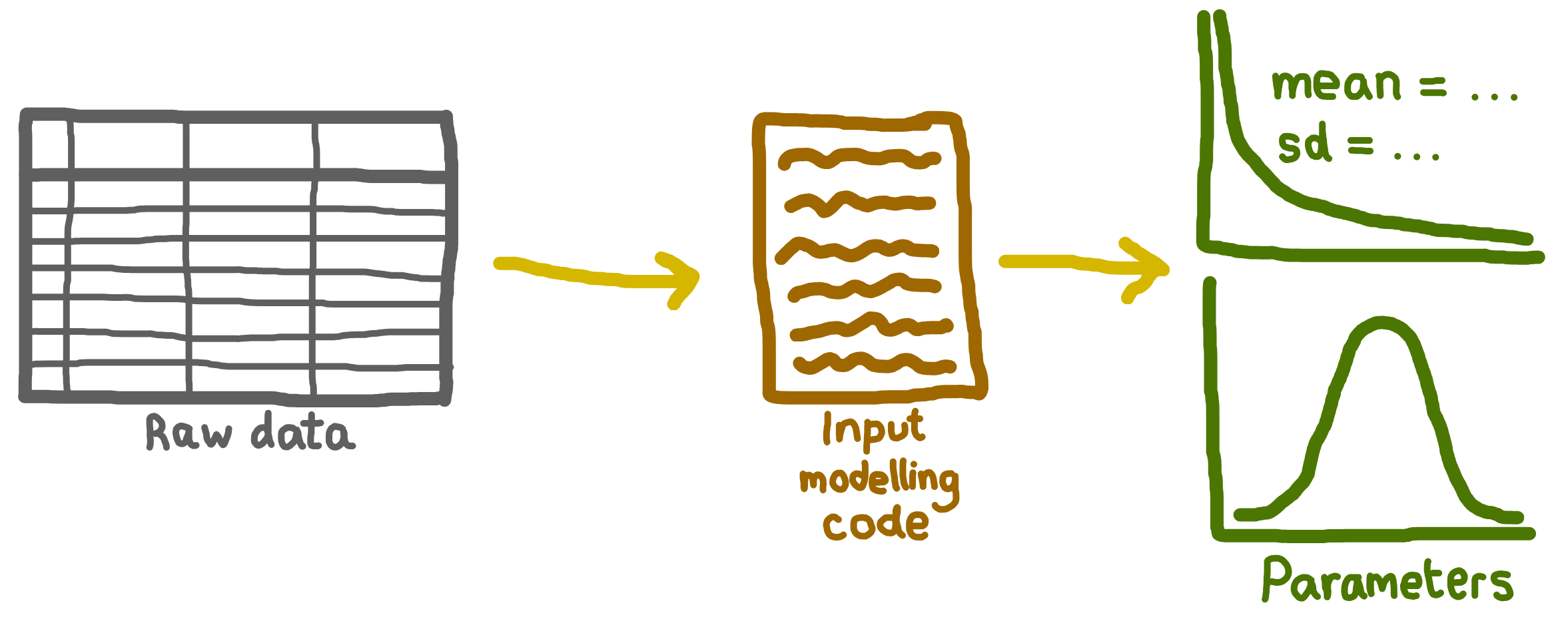
What is included in a RAP?
Your reproducible analytical pipeline (RAP) begins with the first step in your data processing workflow and should include both the data you use and the code that processes it, from initial ingestion through to final outputs. This could be:
- Raw data (if you estimate parameters yourself), or
- Pre-defined parameters (if these are already supplied).
In other words, a complete RAP covers the journey from version-controlled input data to published results, so that anyone with the same data, code, and environment can reproduce your outputs.
Keep in mind that, especially in sensitive areas like healthcare, you may not be able to share your full RAP outside your team or organisation. Even so, it’s crucial to maintain a complete RAP internally so your work remains fully reproducible. For example:
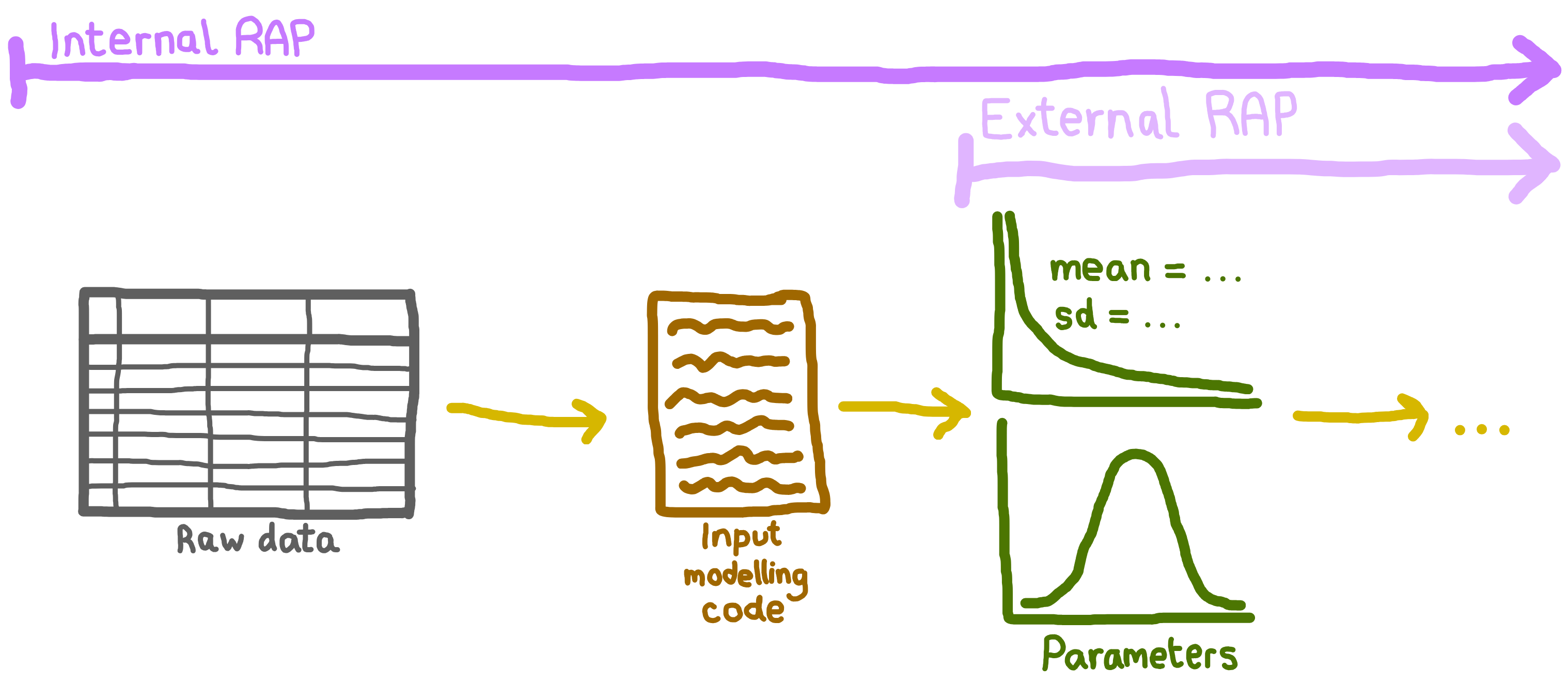
Why is this important? By starting at the source, you make your work transparent and easy to repeat. For instance, if new raw data becomes available, it’s important you have your input modelling code so that you can check your distributions are still appropriate, re-estimate your model parameters, and re-run your analysis.
Never commit secrets or sensitive data to Git
Never commit to Git:
- Raw identifiable data (patient records, personally identifiable information).
- Secrets (API keys, passwords, database connection strings, access tokens).
- Real sensitive parameter files that must remain private.
- Configuration files with embedded credentials (e.g. .env, secrets.yml).
Even if your repository is private, secrets in Git history are vulnerable: anyone with current or future repository access can see the full history, and if the repository ever becomes public, secrets are exposed to the internet. Removing secrets from Git history is painful and error-prone, so prevention is far easier than cure.
Protect your repository
You need to store sensitive data outside your public Git repository. You have two main approaches:
Completely outside any Git repository. Store raw data, secrets, and real sensitive parameters in a secure location entirely separate from version control, such as in a restricted database or institutional data source. This approach is safest when your data requires strict separation and storage rules. Reference these resources in your RAP via documented access paths (e.g. database connection details, file paths) rather than committing exports.
In a private Git repository. For less sensitive data, use a separate private repository (never mix public and private content in the same repository). The advantage is that your team maintains version control and change history for sensitive materials. However, a private repository is not foolproof - it is only as secure as your team’s access permissions, and if the repository’s access ever changes, sensitive data could be exposed.
The way you might set up private and public repositories depends on whether you are allowed to share the real simulation parameter files. This assumes your sensitive data is stored using one of the approaches above (either completely outside Git, or in a private repository if appropriate).
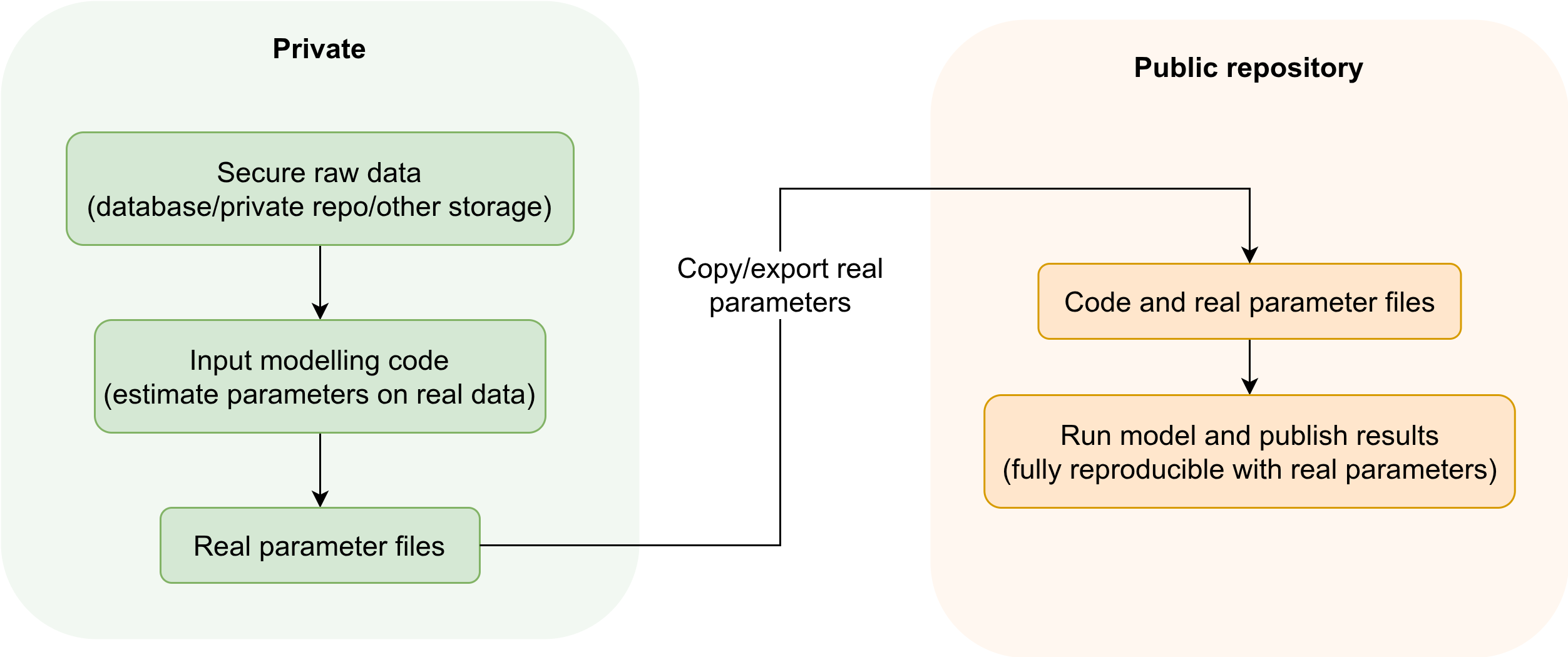
Scenario 1: Allowed to share real parameters
Public repository: Contains everything needed to reproduce your model except sensitive raw data and input modelling scripts.
Private repository (or secure external storage): Contains the sensitive raw data, input modelling scripts, and anything else that cannot be publicly released.
Workflow:
- Do all input modelling (parameter estimation) on real data stored securely (either in a private repository or external to Git).
- Copy the resulting real parameter files to the public repository.
- Run your model and share code/results publicly - users can fully reproduce your analysis using the real parameters.
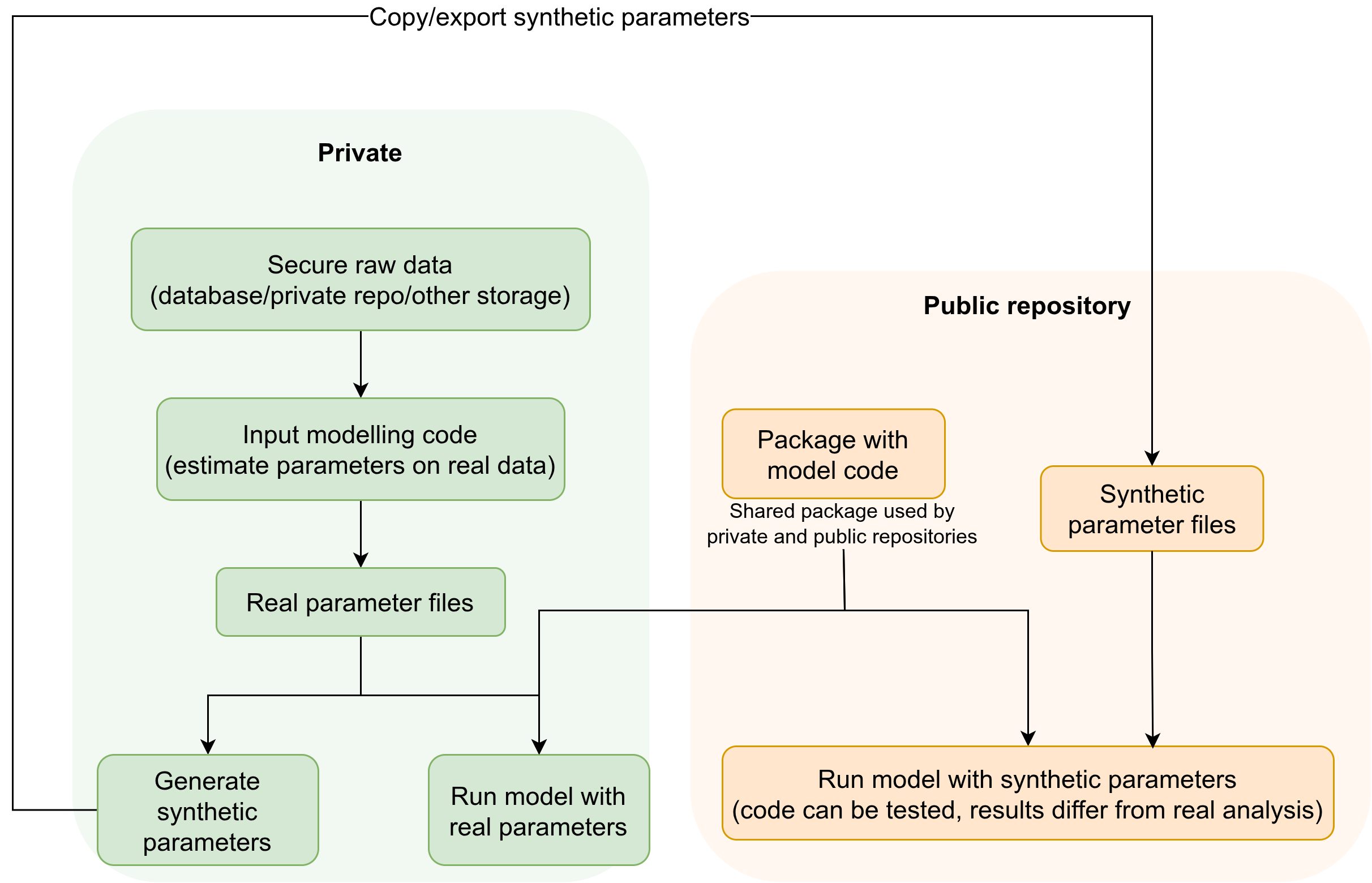
Scenario 2: Only sharing fake/synthetic parameters
Public repository: Contains only synthetic/fake parameter files, synthetic/example data, analysis code, and documentation describing how these synthetic values were generated.
Private repository (or secure external storage): Contains the sensitive raw data and real parameter files, plus scripts for analysis with the real values.
Shared simulation package (in it’s own repository or part of the public repository): All analysis code is developed as a package that can be installed and used by both the public and private repositories. This greatly reduces code duplication.
Workflow:
- Estimate parameters using real data stored securely (either in a private repository if appropriate, or completely outside Git for highly sensitive data).
- Generate synthetic parameter files for the public repository, documenting the generation process.
- Use the shared simulation package in both repositories.
- Run and share the full workflow in public with synthetic parameters; run the actual analysis in private with the real parameters.
Some additional safeguards to protect your repository include to:
- Add sensitive files to
.gitignore. - Store secrets using environment variables or a secrets manager.
- Use pre-commit secret scanners (e.g.,
git-secrets,detect-secrets) to block commits with secrets.
If you accidentally commit sensitive data
See GitHub’s guide to removing sensitive data for advice on what to do!
Raw data
This is data which reflects the system you will be simulating. It is used to estimate parameters and fit distributions for your simulation model. For example:
| ARRIVAL_DATE | ARRIVAL_TIME | SERVICE_DATE | SERVICE_TIME | DEPARTURE_DATE | DEPARTURE_TIME |
|---|---|---|---|---|---|
| 2025-01-01 | 0001 | 2025-01-01 | 0007 | 2025-01-01 | 0012 |
| 2025-01-01 | 0002 | 2025-01-01 | 0004 | 2025-01-01 | 0007 |
| 2025-01-01 | 0003 | 2025-01-01 | 0010 | 2025-01-01 | 0030 |
| 2025-01-01 | 0007 | 2025-01-01 | 0014 | 2025-01-01 | 0022 |
Checklist: Managing your raw data
Always
Keep copies of your raw data
Or, if you can’t export it, document how to access it (e.g. database location, required permissions).Record metadata
Include: data source, date obtained, time period covered, number of records, and any known issues.Keep copy of the data dictionary
If none exists, create one to explain your data’s structure and variables.
If you can share the data:
Make the data openly available
Follow the FAIR principles: Findable, Accessible, Interoperable, Reusable.Deposit in a trusted archive
Use platforms like Zenodo, Figshare, GitHub or GitLab.Add an open data licence
Examples: CC0, CC-BY.Provide a citation or DOI
Make it easy for others to reference your dataset.
If you cannot share the data:
Describe the dataset
Include details in your documentation.Share the data dictionary
If allowed, to help others understand the data structure.Consider providing a synthetic dataset
Create a sample with the same structure (but no sensitive information) so that others can understand the data layout and test run code.Explain access restrictions
State why sharing isn’t possible and provide contact information for access requests.
Example metadata
“Data sourced from the XYZ database. Copies are available in this repository, or, to access directly, log in to the XYZ database and navigate to [path/to/data].
Data covers January 2012 to December 2017, with [number] records. Note: [details on missing data, known issues, etc.].
A copy of the data dictionary is available in the repository or online at [URL].”
Access to the dataset is restricted due to patient confidentiality. Researchers interested in accessing the data must submit a data access request to the XYZ Data Governance Committee. For more information, contact data.manager@xyz.org.
Example data dictionary
A data dictionary describes each field, its format, units, and any coding schemes used. Several resources exist to provide guidance on their creation, like “How to Make a Data Dictionary” from OSF Support.
Example data dictionary:
| Field | Field name | Format | Description |
|---|---|---|---|
| ARRIVAL_DATE | CLINIC ARRIVAL DATE | Date(CCYY-MM-DD) | The date on which the patient arrived at the clinic |
| ARRIVAL_TIME | CLINIC ARRIVAL TIME | Time(HH:MM) | The time at which the patient arrived at the clinic |
| DEPARTURE_DATE | CLINIC DEPARTURE DATE | Date(CCYY-MM-DD) | The date on which the patient left the clinic |
| DEPARTURE_TIME | CLINIC DEPARTURE TIME | Time(HH:MM) | The time at which the patient left the clinic |
| SERVICE_DATE | NURSE SERVICE START DATE | Date(CCYY-MM-DD) | The date on which the nurse consultation began |
| SERVICE_TIME | NURSE SERVICE START TIME | Time(HH:MM) | The time at which the nurse consultation began |
Obtaining a DOI
If you’re able to openly share the data, you can include it directly in your GitHub repository alongside your code and documentation for convenience and reproducibility. For longer-term access, public citation, or larger datasets, it’s often better to deposit the data in a separate and/or specialised repository, and then simply link from your code to the archive record.
As described in the “The Research Data Management Workbook”, when choosing where to store data, you should consider the available data repository types:
- Disciplinary: Designed for a specific research field.
- Institutional: Provided by a university, funder, or research centre.
- Generalist: Accepts any data type.
Some recommendations for generalist repositories are available:
- “Recommended Repositories” from PLOS.
- “Accessing Scientific Data - Generalist Repositories” from NIH Grants & Funding.
Instructions for Zenodo archiving are provided on our sharing and archiving page.
Input modelling code
Input modelling code refers to the scripts used to define and fit the statistical distributions that represent the uncertain inputs for a simulation model.
Input modelling is often first developed in an interactive environment (e.g. a Jupyter or Quarto notebook). This is a good place to explore the data and prototype candidate distributions. However, once your approach stabilises, it is helpful to move key functions for estimating and validating inputs into scripts or a package module, and call them from the notebook. This keeps the notebook focused on narrative and diagnostics, while the reusable logic lives in version-controlled code that can be tested and reused across projects.
In a RAP, store these input modelling scripts alongside your simulation code (for example under src/input_modelling/ or an equivalent module) so that input estimation is a visible, testable part of the pipeline rather than hidden inside a single notebook.
These scripts are often not shared, but are an essential part of your simulation RAP. Sharing them ensures transparency in how distributions were chosen and allows you (or others) to re-run the process if new data or assumptions arise.
Checklist: Managing your input modelling code
If you can share the code:
- Include the input modelling code in your repository
Store it alongside your simulation code and other relevant scripts.
If you cannot share the code:
- For internal use:
- Store the code securely and ensure it is accessible to your team or organisation - avoid saving it only on a personal device.
- Use version control (e.g. a private GitHub repository) to track changes and maintain access.
- For external documentation:
- Clearly describe the input modelling process.
- Explain why the code cannot be shared (e.g. it contains sensitive or proprietary logic).
Parameters
Parameters are the numerical values used in your model, like the arrival rates, service times or probabilities.
Checklist: Managing your parameters
Always
Keep a structured parameter file
Store all model parameters in a clearly structured format like a CSV file or a script.Document each parameter
Include a data dictionary or documentation describing each parameter, its meaning, units, and any abbreviations or codes used.Be clear how parameters were determined.
If you calculated them, link to the input modelling code or describe the calculation steps (as above). If they were supplied to you, then clearly state the source of the parameters and any known processing or transformation.
If you can share the parameters:
- Include parameter files in your repository
Store parameter files alongside your model code and documentation.
For others to run your model, they need parameter values. These can be real parameters (ideal for full reproducibility) or synthetic parameters (which allow others to run and test the code, but will produce different numerical results). Parameters are often less sensitive than patient-level data because they are aggregated values; however, in some settings they may still be sensitive. In those cases, you should:
Provide synthetic parameters
Supply artifical values for each parameter, clearly labelled as synthetic.Describe how synthetic parameters were generated
Document the process or basis for generating synthetic values (e.g. totally artifical, based on published ranges, expert opinion).Explain access restrictions
State why real parameters cannot be shared and provide contact information fore requests, if appropriate.
Test yourself
Further information
“How to Make a Data Dictionary” from OSF Support.
Simple guide on creating a data dictionary.
“Open Research Data and Materials” from the Open Science Training Handbook.
Explains principles like FAIR, as well as other guidance on sharing data.
“The Research Data Management Workbook” from Kristin Briney 2024.
Comprehensive workbook full of advice on research data management including: documentation, file organisation and naming, storage, management plans, sharing and archiving.