Quarto features
In the last page, you worked with Markdown, which is a simple way to format text that works in lots of tools. Quarto lets you keep using that same Markdown, but it also adds extra features on top.
Behind the scenes, Quarto uses a program called Pandoc. Pandoc takes your Markdown and converts it into many different formats (for example, HTML, PDF, Word, or slides). On top of Pandoc, Quarto adds its own features and settings (for example, callouts, columns, citations, and cross‑references) that you control from a single .qmd file.
This page gives a quick tour of some of those “Quarto extras” that go beyond plain Markdown.
1 Callouts
Quarto extends Markdown with callouts, which are highlighted boxes you can use for notes, tips, or warnings.
Callouts use a small bit of extra syntax that Quarto understands as a “special box” rather than normal text. In Markdown, ::: ... ::: defines a block (a kind of container) that Quarto treats like an HTML <div>. By adding a class to that block, you tell Quarto what kind of callout it is.
A simple callout note looks like this:
:::starts the block.{.callout-note}says that this is a class “callout-note” (just like HTML<div class="callout-note">)/- Everything until the closing
:::is the content of the callout. - The final
:::closes the block.
Markdown:
::: {.callout-note}
This is a callout.
You can use it to draw attention to important information.
:::
Output:
This is a callout. You can use it to draw attention to important information.
You can change the type:
::: {.callout-tip}
This is a tip.
:::
::: {.callout-warning}
This is a warning.
:::::: {.callout-important}
This is important information.
:::::: {.callout-caution}
This is a caution.
:::This is a tip.
This is a warning.
This is important information.
This is a caution.
You can add a title:
::: {.callout-tip title="Helpful tip"}
Remember to save your file before you render.
:::Remember to save your file before you render.
You can also set the callout to collapse:
::: {.callout-note title="More details" collapse="true"}
This extra information is hidden until you click the arrow.
:::This extra information is hidden until you click the arrow.
You can change the appearance style to simple or minimal:
::: {.callout-note appearance="simple"}
This is a simple callout.
:::
::: {.callout-note appearance="minimal"}
This is a minimal callout.
:::This is a simple callout.
You can also hide the icon:
::: {.callout-note icon="false"}
Default callout with icon removed
:::Task: In quarto_features.qmd:
2 Columns
You can create columns using the same ::: ... ::: fenced blocks, with a .columns container and one or more .column blocks inside.
For example:
:::: {.columns}
::: {.column}
{fig-alt="Photograph of South Cloisters"}
:::
::: {.column}
**South Cloisters**, University of Exeter, St Luke's Campus, Heavitree Road, Exeter EX1 2LU
:::
::::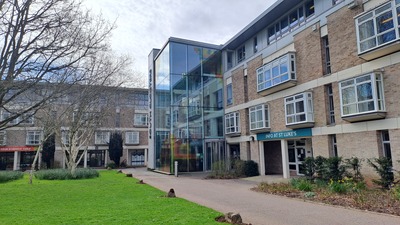
South Cloisters, University of Exeter, St Luke’s Campus, Heavitree Road, Exeter EX1 2LU
By default, columns share the space equally. You can control their width by adding width= percentages to each column. For example:
:::: {.columns}

::: {.column width=60%}
:::

::: {.column width=5%}
:::

::: {.column width=35%}
:::

::::
Task: In quarto_features.qmd:
3 Link that opens in a new tab by default
You’ll recall from the Markdown page that we can create a link using [text](link).
In Quarto, we can amend the link so it opens in a new tab by default by adding {target="_blank"} to the end.
For example:
[Visit the University of Exeter website](https://www.exeter.ac.uk){target="_blank"}Visit the University of Exeter website
Task: In quarto_features.qmd:
4 Footnotes
Here is some text with a footnote.[^1]

[^1]: This is the content of the footnote.

    You can include additional details by going two line below and tab indent.
Here is some text with a footnote.1
Task: In quarto_features.qmd:
5 Citations
With a bibliography file (e.g., references.bib), Quarto can automatically format citations and a reference list.
A bibliography file (with extension .bib) is a text file that stores information about your sources (for example, author, year, title, journal). Each source has a short key, like @feng_ultrasonic_2006, that you can use in your writing. Reference managers such as Zotero can export your library to a .bib file, so you do not have to type these entries by hand.
references.bib
@article{feng_ultrasonic_2006,
    title = {Ultrasonic communication in frogs},
    volume = {440},
    copyright = {2006 Springer Nature Limited},
    issn = {1476-4687},
    url = {https://www.nature.com/articles/nature04416},
    doi = {10.1038/nature04416},
    abstract = {Some bats, dolphins and rodents are notable among vertebrates in being able to produce and detect ultrasonic frequencies. Now for the first time an amphibian can be added to that select list. The spectacular bird-like sounds made by a type of Chinese torrent frog were known to edge into the ultrasonic range: now these frogs are shown to use ultrasonics as a form of communication. The males do at least, during competition for territory. Frogs are a long way, evolutionarily speaking, from the other known users of ultrasonics so this ability seems to have evolved independently several times. It is possible, too, that many other species are chatting away in the ultrasonic waveband, but that nobody has looked for them.},
    language = {en},
    number = {7082},
    urldate = {2026-03-26},
    journal = {Nature},
    author = {Feng, Albert S. and Narins, Peter M. and Xu, Chun-He and Lin, Wen-Yu and Yu, Zu-Lin and Qiu, Qiang and Xu, Zhi-Min and Shen, Jun-Xian},
    month = mar,
    year = {2006},
    note = {Publisher: Nature Publishing Group},
    keywords = {Humanities and Social Sciences, multidisciplinary, Science},
    pages = {333--336},
    file = {Full Text PDF:/home/amy/Zotero/storage/64S36KD5/Feng et al. - 2006 - Ultrasonic communication in frogs.pdf:application/pdf},
}

@article{starnberger_uni-_2014,
    title = {From uni- to multimodality: towards an integrative view on anuran communication},
    volume = {200},
    issn = {0340-7594},
    shorttitle = {From uni- to multimodality},
    url = {https://pmc.ncbi.nlm.nih.gov/articles/PMC4138437/},
    doi = {10.1007/s00359-014-0923-1},
    abstract = {Undeniably, acoustic signals are the predominant mode of communication in frogs and toads. Acoustically active species are found throughout the vast diversity of anuran families. However, additional or alternative signal modalities have gained increasing attention. In several anurans, seismic, visual and chemical communications have convergently evolved due to ecological constraints such as noisy environments. The production of a visual cue, like the inevitably moving vocal sac of acoustically advertising males, is emphasized by conspicuously coloured throats. Limb movements accompanied by dynamic displays of bright colours are additional examples of striking visual signals independent of vocalizations. In some multimodal anuran communication systems, the acoustic component acts as an alert signal, which alters the receiver attention to the following visual display. Recent findings of colourful glands on vocal sacs, producing volatile species-specific scent bouquets suggest the possibility of integration of acoustic, visual and chemical cues in species recognition and mate choice. The combination of signal components facilitates a broadened display repertoire in challenging environmental conditions. Thus, the complexity of the communication systems of frogs and toads may have been underestimated.},
    number = {9},
    urldate = {2026-03-26},
    journal = {Journal of Comparative Physiology. A, Neuroethology, Sensory, Neural, and Behavioral Physiology},
    author = {Starnberger, Iris and Preininger, Doris and Hödl, Walter},
    year = {2014},
    pmid = {24973893},
    pmcid = {PMC4138437},
    pages = {777--787},
    file = {Full Text:/home/amy/Zotero/storage/YHX45APP/Starnberger et al. - 2014 - From uni- to multimodality towards an integrative.pdf:application/pdf},
}
Provide the path to your bibliography in the YAML metadata for the page e.g.,:
---
title: "My Document"
bibliography: references.bib
---
A simple in-text citation looks like this… can wrap in () and [] if want… use @ and identifier…
Some frogs can communicate using ultrasonic calls that are far above the range of human hearing (@feng_ultrasonic_2006).Some frogs can communicate using ultrasonic calls that are far above the range of human hearing (Feng et al. (2006)).
Multiple citations can be combined, use semicolon to separate
Ultrasonic communication in frogs shows that amphibian hearing and vocal behaviour are more flexible than scientists once thought (@feng_ultrasonic_2006; @starnberger_uni-_2014).By default, a list of works cited will be placed at the end of the document. You can change where this is by provided refs div -
::: {#refs}
:::Task: In quarto_features.qmd:
6 Cross-references
Quarto can automatically number and cross‑reference figures, tables, sections, and equations.
To make something cross‑referenceable, you give it an identifier, then refer to it with @id.
For example, you can refer to tables by adding a caption and then including a #tbl- label in braces at the end of the caption
| Letter | Number |
| - | - |
| A | 1 |
| B | 2 |
| C | 3 |

: Table with ABC and 123 {#tbl-letters}

See @tbl-letters| Letter | Number |
|---|---|
| A | 1 |
| B | 2 |
| C | 3 |
See Table 1
See the page on Cross-references from the Quarto documentation for instructions on how to reference other things (e.g., lists, figures, code listings, callouts, sections).
Task: In quarto_features.qmd:
7 Math
Quarto supports LaTeX‑style math notation for inline and display equations.
LaTeX is a markup language commonly used for writing mathematics. Quarto understands a subset of LaTeX math syntax so you can write formulas directly in your text. Inline math appears inside a sentence (for example, $y = mx + c$), and display math appears on its own line, centred and spaced out, using $$ ... $$.
In-line math:
The solution is $x = \frac{-b \pm \sqrt{b^2 - 4ac}}{2a}$.The solution is \(x = \frac{-b \pm \sqrt{b^2 - 4ac}}{2a}\).
Display math:
$$
x = \frac{-b \pm \sqrt{b^2 - 4ac}}{2a}
$$
\[ x = \frac{-b \pm \sqrt{b^2 - 4ac}}{2a} \]
Task: In quarto_features.qmd:
8 Definition lists
Definition lists are useful for small glossaries or when you want to introduce a few key concepts with short explanations. To creat them, write therm term on online line, then start the defintion on the next line with a colon : and space.
Thing 1
: Definition of thing 1

Thing 2
: Definition of thing 2- Thing 1
- Definition of thing 1
- Thing 2
- Definition of thing 2
Task: In quarto_features.qmd:
9 Line blocks
By default, Markdown ignores most extra spaces at the start of a line and treats single line breaks as part of the same paragraph. Line blocks give you precise control: they keep each line and its leading spaces exactly as you typed them.
Default:
South Cloisters,
    University of Exeter,
    St Luke's Campus,
    Heavitree Road,
    Exeter EX1 2LU
South Cloisters, University of Exeter, St Luke’s Campus, Heavitree Road, Exeter EX1 2LU
Line block:
| South Cloisters,
|     University of Exeter,
|     St Luke's Campus,
|     Heavitree Road,
| Exeter EX1 2LUUniversity of Exeter,
St Luke’s Campus,
Heavitree Road,
Exeter EX1 2LU
Task: In quarto_features.qmd:
10 Includes
Sometimes you want to reuse the same content in more than one page (e.g., a short disclaimer, a project description, or a list of learning outcomes). Quarto lets you “include” another file so that its contents are pulled in when you render.
For example, if you have a file called snippet.md in the same folder:
{{< include snippet.md >}}When you render, the text from snippet.md will appear at that point in the page
Task: In quarto_features.qmd:
Footnotes
This is the content of the footnote.
You can include additional details by going two line below and tab indent.↩︎